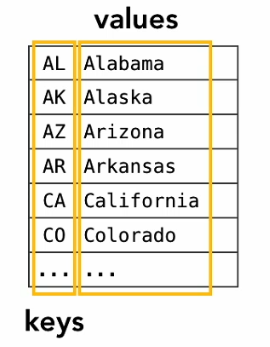
The other primary type of array we can encounter is an associative array, “an abstract data type that stores a collection of (key, value) pairs, such that each possible key appears at most once in the collection” (Wikpedia, Associative Array)
We can imagine this type of data structure being useful when working with data that is connected or related to other pieces of information.
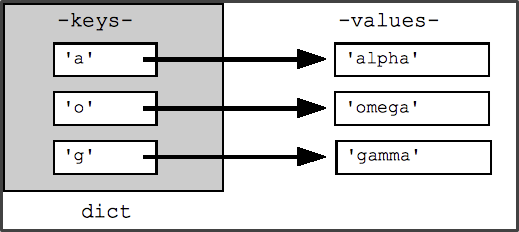
Python stores associate arrays using the dictionary data structure. Python dictionaries consist of key-value pairs, where the key is working as an identifier or index. To put that another way, a dictionary is a mapping between a set of indeces (keys) and a set of values. Each key maps to a value, and the association of a key and a value is called a key-value pair.
Creating a Dictionary
We can create a dictionary using the curly braces {} syntax or the dict() function.
# create dictionary
english_to_french = {
  'one': 'un',
  'two': 'deux',
  'three': 'trois',
  'four': 'quatre',
  'five': 'cinq'
}

# check data type
type(english_to_french)
# create dictionary
english_to_french = dict({
'one': 'un',
'two': 'deux',
'three': 'trois',
'four': 'quatre',
'five': 'cinq'
}
# check data type
type(english_to_french)Accessing Keys & Values
We can use the index operator ([]) and key values to select specific values in the dictionary.
# access value for one key
english_to_french['one']

# access value for five key
english_to_french['five']

# access value for asdf key
english_to_french['asdf']We can use the .keys() and .values() methods to output all of the keys or values in a dictionary.
# output keys
print(english_to_french.keys())

# output values
print(english_to_french.values())Modifying
We can modify values in our dictionary using the index [] and assignment = operators. This is also the workflow we would use to add values to a dictionary.
# create new dictionary
numbers = {
  '1': 'one',
  '2': 'two',
  '3': 'five'
}

# modify value for 3 key
numbers['3'] = 'three'

# add key-value pairs to dictionary
numbers['4'] = 'four'
numbers['5'] = 'five'
numbers['6'] = 'six'

# show updated dictionary
for key value in numbers.items():
  print(key, value)
Comprehension Check
 | Dictionaries in Python Comprehension Check |
Application
Q6: Write a program that creates a dictionary on a topic of your choosing. Include at least 5 key-value pairs. Use arguments and syntax covered in this section of the chapter to accomplish the following tasks:
Add a new element to your dictionary
Update or modify an element in your dictionary
Print a list of all the keys in your dictionary
Print a list of all the values in your dictionary
Answer to this question includes program + comments that document process and explain your code.