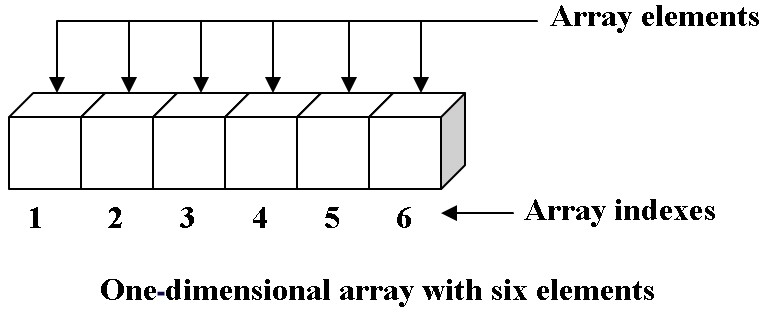
“In computer science, an array is a data structure consisting of a collection of elements (values or variables), each identified by at least one array index or key...The simplest type of data structure is a linear array, also called one-dimensional array” (Wikipedia, "Array (data structure)")
We can think of arrays as one-dimensional, linear data structures made up of a collection of items. As the definitions note, we can access specific elements in the array by using an index or key value. In Python, an list is a single-dimension array.
List basics
We can create lists using square brackets [] or the list() function.
# creating a list of numbers using square brackets
numbers = [1, 3, 5, 7, 9]

# checking data type
type(numbers)
We can determine the number of elements in the list using the len() function.
len(fruits)Another example, this time with a list of strings.
# creating a list of strings using the list function
words = list(("apple", "banana", "blueberry", "cherry")) # note the double round bracket syntax

# check data type
type(words)

# determine number of elements in list
len(fruits)
Python lists also support negative indexing- we can use negative index values to count right-to-left.
# access last value
fruits[-1]

# access next to last value
fruits[-2]
We can also use the .index() method to output the position for specific values (if they are present in the structure).
# return index for cherry
print("The index for cherry is ", fruits.index("cherry"))

# return index for pear
print("The index for pear is ", fruits.index("pear"))
The last line of the program returns an IndexError message because pear is not a value in the list.
Additional List Methods
Python includes a number of built-in methods we can use to interact with lists. Brief explanations and examples are provided in each section.
Modifying Values
Unlike strings, lists in Python are mutable, meaning they can be modified after they have been created. We can use the index and assignment operators ([] and =) to modify specific values.
# list of string objects
fruits = ["apple", "banana", "blueberry", "cherry"]

# modify second value
fruits[1] = "peach"

# show new list
print(fruits)
Adding Values
We can add values to a list using .append(), .insert(), or .extend().
.append()adds or appends a value to the end of a list.insert()adds or inserts a value at a specific position.extend()extends a list by adding specific elements to the end of the current list
# create list of numbers
numbers = [1, 3, 5, 7, 9]

# add value to end of list using append
numbers.append(13)

# show updated list
print(numbers)
# show updated list
print(numbers)
# insert value at specific position
numbers.insert(4, 11)
# show updated list
print(numbers)# show updated list
print(numbers)
# create second list of number values
num2 = [15, 17, 19]
# add num2 to numbers using extend
numbers.extend(num2)
# show updated list
print(numbers)Removing Values
We can remove values from a list using .remove(), .pop(), or del.
.remove()removes the first matching element from a list.pop()removes an item at a specific position; if no index is supplied, last element is removeddelremoves or deletes the value at a specific position
# show updated list
print(numbers)

# remove 19 using remove
numbers.remove(19)

# show updated list
print(numbers)
# show updated list
print(numbers)
# remove 17 using pop
numbers.pop(-1)
# show updated list
print(numbers)# show updated list
print(numbers)
# remove 15 using del
del numbers[7]
# show updated list
print(numbers)Slicing
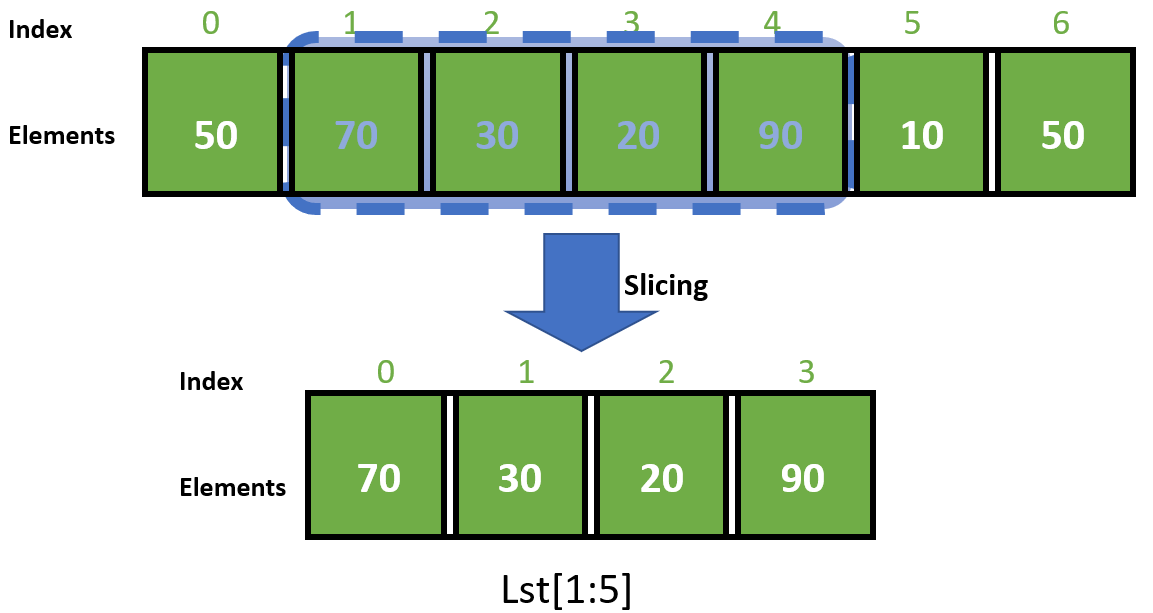
We can also modify a list using a technique called list slicing, selecting multiple values in the list using their position.
In Python, we use a combination of index operators [] and index values for list slicing.
Additional Resources
For more on list slicing in PythoN:
# list of strings
dorms = ["alumni", "badin", "baumer", "breen-phillips", "carroll", "cavanaugh", "dillon", "duncan", "dunne", "farley", "fisher", "flaherty", "howard", "johnson", "keenan", "keough", "knott", "lewis", "lyons", "mcglinn", "morrissey", "oneill", "pangborn", "pasquerilla east", "pasquerilla west", "ryan", "st. edward's", "sigfried", "sorin", "stanford", "walsh", "welsh", "zahm"]

# use list slicing to show first 3 strings
print(dorms[0:3])
Testing for Membership
We can also test for membership using the in and not in operators.
# tests if welsh is in dorms list
"welsh" in dorms # returns True

# tests if sophomore is not in dorms list
"sophomore" not in dorms # returns True
# show list
print(dorms)
# show nubmer of times howard appears in list
print(dorms.count("howard"))
# show index position for lewis
print(dorms.index("lewis"))Searching & Sorting
We can search for values in a list using .count() or .index().
.count()returns the number of times a value appears in the list.index()returns the specific position for a list item
Sorting
We can sort the values in the list using .sort(), sorted(), and .reverse().
A few notes on sorting lists in Python.
Ascending order in Python is
[0, 1, 2, 3..]and[a, b, c, d..]Sorting a list in-place changes the underlying order of items in a list
Generating a sorted version of a list does not change the underlying item order
So how do the sorting functions work in Python?
.sort()does not have any output- it sorts the list in place; we can set thereverseparameter toTrueto sort in descending order.sorted()returns a sorted version of the list.reverse()does not have any output- it reverse sorts the list in place
# show list of dorms
print(dorms)

# generate sorted version using sorted
print(sorted(dorms))

# change underlying order using a reverse sort
dorms.sort(reverse=True) # remember sort does not have an output

# show updated list
print(dorms)
Another workflow for sorting list values in descending order:
# sort list alphabetically
dorms.sort()

# show updated list
print(dorms)

# reverse sort using reverse
dorms.reverse()

# show updated list
print(dorms)
Summary Statistics
Python includes a few built-in fucntion that calculate summary statistics for lists with numeric values.
.max()identifies the highest value in the list.min()identifies the lowest value in the list.sum()calculates the sum for all values in the list
# create list of numbers
numbers = [1, 3, 5, 7, 9, 11, 13, 15, 17]

# highest value
print("The highest value in this list is ", str(max(numbers)))

# lowest value
print("The lowest value in this is list ", str(min(numbers)))

# sum
print("The sum of the values in this list is ", str(sum(numbers)))
List Syntax Digest
Creating a list:
[]orlist()Checking length of list:
len()Accessing values using index:
fruits[0],fruits.index("cherry")Testing for membership:
inornot inModifying an existing list value:
fruits[1] = "new value"Appending a value to a list:
numbers.append(13)Inserting a value in a specific position:
numbers.insert(4, 11)Extending a list (to include additional values):
numbers.extend(num2)Removing values from a list:
numbers.remove(19),numbers.pop(-1),del numbers[7]Slicing a list:
dorms[0:3]Searching for values:
.count(),.index()Sorting:
.sort(),.sorted(),.reverse()Summary statistics:
.max(),.min(),.sum()
Additional Resources
More on arrays/lists (general):
Kenneth Leroy Busbee and Dave Braunschweig, “Arrays and Lists” in Programming Fundamentals
More on lists in Python:
Allen Downey, Chapter 10 “Lists” in Think Python: How To Think Like a Computer Scientist (O’Reilly, 2016): 107-124.
Comprehension Check
 | Lists in Python Comprehension Check |
Application Questions
Q4: Write a program that creates a list of numbers. Use the arguments and syntax presented in this section of the chapter to include code in your program that answers the following questions:
What is the length of your list?
What is the number position for each of the items in your list?
How would you return the value of the first item?
How would you return the value of the last item?
Answer to this question includes program + comments that document process and explain your code.
Q5: Modify your Q4 program (working with the same list), using arguments and syntax covered in this section of the chapter to accomplish the following tasks:
Add a new item to your list
Delete an item from your list
Sort your list in-place
Generate a sorted version of your list
Reverse your list in-place
Determine the min and max values for your list
Answer to this question includes program + comments that document process and explain your code.