
File Formats#
Files#
Note
Some chapters or chapter sections will involve downloading paticular files onto your local computer. Typically, you’ll have the option to download these files individually, or as a compressed folder you’ll have to extract to access the contents.
Typically, these files will be in your computer’s Downloads folder. Prof. Walden recommends you move them to somewhere on your computer (or cloud, i.e. Google Drive) that you’ll be able to easily find and access.
For this section of the chapter, you’ll need to download three different files:
hello_world.txthello_world.rtfhello_world.docx
File Downloads
Links to download each file:
To download all three files as a compressed folder:
Lecture#
 |
File Formats |
Key Concepts#
File Manager (or File Browser)
“A file manager or file browser is a computer program that provides a user interface to manage files and folders. The most common operations performed on files or groups of files include creating, opening (e.g. viewing, playing, editing or printing), renaming, copying, moving, deleting and searching for files, as well as modifying file attributes, properties and file permissions. Folders and files may be displayed in a hierarchical tree based on their directory structure” (Wikipedia)
Examples: Finder (Mac), File Explorer (Windows)
File Extension (or Filename Extension)
“A filename extension, file name extension or file extension is a suffix to the name of a computer file (e.g., .txt, .docx, .md). The extension indicates a characteristic of the file contents or its intended use. A filename extension is typically delimited from the rest of the filename with a full stop (period)” (Wikipedia)
Proprietary File Formats
“We will say that a file format is proprietary if the mode of presentation of its data is opaque and its specification is not publicly available. Proprietary formats are developed by software companies in order to encode data produced by their applications: only the software produced by a company who owns the specification of a file format will be able to read correctly and completely the data contained in this file. Proprietary formats can be further protected through the use of patents and the owner of the patent can ask royalties for the use or implementation of the formats in third-party’s software” (OpenFormats.org)
Common proprietary formats include:
PDF(Adobe Portable Document Format)DOCX(Microsoft Word Document)XLSX(Microsoft Excel Document)
Open File Formats
“We will say that a file format is open if the mode of presentation of its data is transparent and/or its specification is publicly available. Open formats are ordinarily standards fixed by public authorities or international institutions whose aim is to establish norms for software interoperability. There are nevertheless cases of open formats promoted by software companies which choose to make the specification of the formats used by their products publicly available…an open format can either be coded in a transparent way (readable in any text editor) or in a binary mode (unreadable in a text editor but thoroughly decodable once the format specifications are known)” (OpenFormats.org)
Common open formats include:
TXT(plain-text)CSV(comma-separated value)HTML(hyper-text markup language)PNG(portable network graphic)
Comprehension Check#
 |
File Formats Comprehension Check |
 |
File Formats Comprehension Check |
Putting It All Together #
Digital sound represents another example of file formats and encoding in action. The image below shows a 16-bit sound sample.
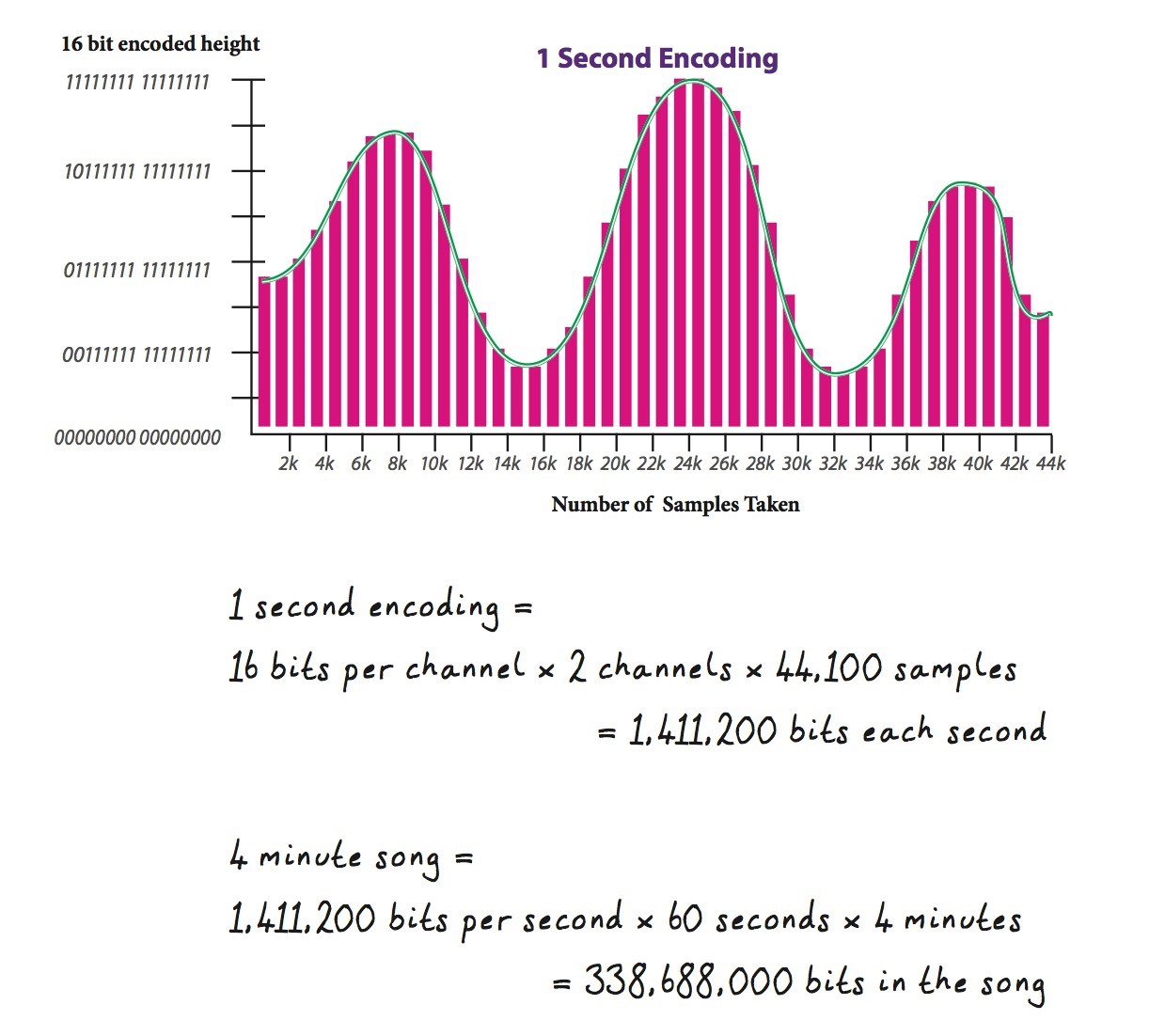
Digital sound recordings are created by taking samples of sound at a specific rate. “CD quality” sound is sampled at 44.1 kHz (kilohertz) or 44,100 times per second. This means that 44,100 times per second, a program measures and records the height of a sound’s sound wave and then translates the height to a binary representation in 16-bits or 2 Bytes.
The important take away here is that any piece of information can be represented in bits and then interpreted by the computer. It’s not likely you will have to work with the machine at this level. For now, just know that behind the scenes everything that you input into the computer and everything that is outputted is at some point in the process a string of bits.