
Style & Formatting#
HTML allows us to add style to our pages internally, or inline, using HTML tags. We’ve already styled our pages a bit using the <h1> tag. <h1> designates preformatted text that is larger than the <p> or paragraph text. But, what if we want to add color or change the font on our page?

We can add style to individual HTML element tags using style attributes. The syntax for style attributes is style="STYLE_PROPERTY:PROPERTY_VALUE;"
Examples#
For example, if we wanted text characters in the H1 tag to be blue and center aligned:
<h1 style="color:blue; text-align:center;">Hello World!</h1>
And if we wanted text in the p tag to have a light blue background and a different font:
<p style="background-color:powderblue; font-family:courier;">This is my first HTML page.</p>
Putting It All Together#
All style elements are enclosed in quotation marks and include a semicolon after each element. To put that all together:
<body>
 <h1 style="color:blue; text-align:center;">Hello World!</h1>
 <p style="background-color:powderblue; font-family:courier;">This is my first HTML page.</p>
</body>
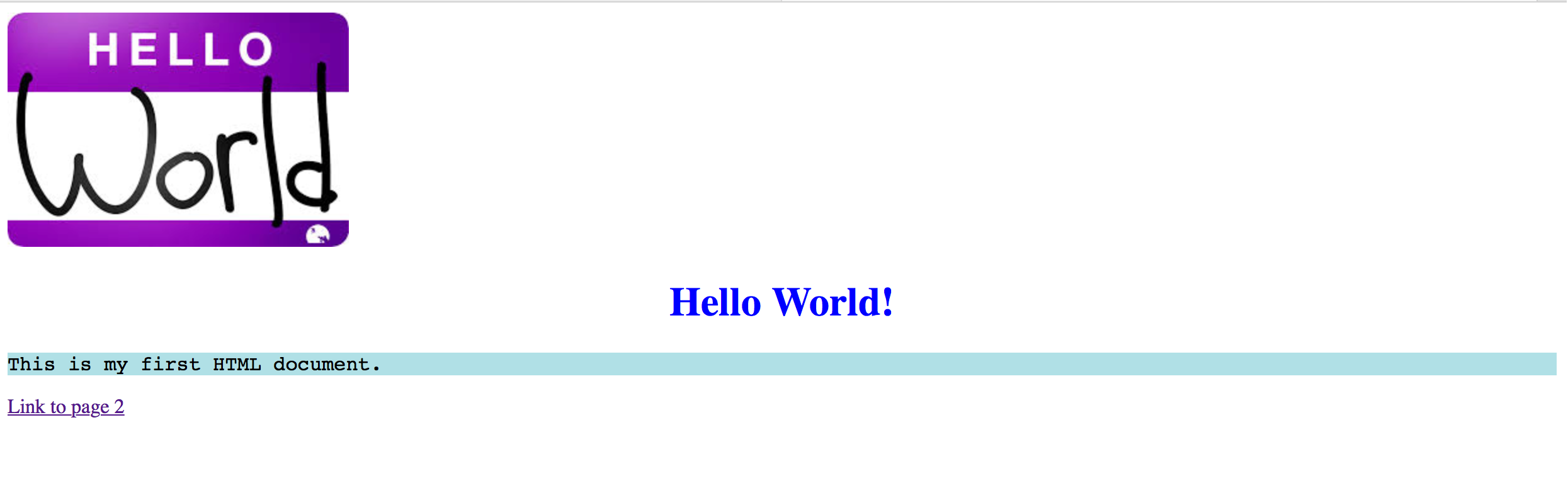
We can see how the style attributes are changing how the web page content displays:
The
<h1>heading has has a blue text color and is center-alignedThe
<p>content has a powder blue background color and Courier font
Additional Resources#
For more on HTML styles:
HTML Styles: https://www.w3schools.com/html/html_styles.asp
HTML Colors: https://www.w3schools.com/html/html_colors.asp
Take a look at the W3Schools HTML Colors page. See anything familiar? HTML supports multiple formats for representing color.
Application#
If you haven’t already, experiment with modifying your existing HTML pages to include some of these (or other) style elements.