
Computer Networks#
Lecture#
 |
Computer Networks |
Key Concepts#
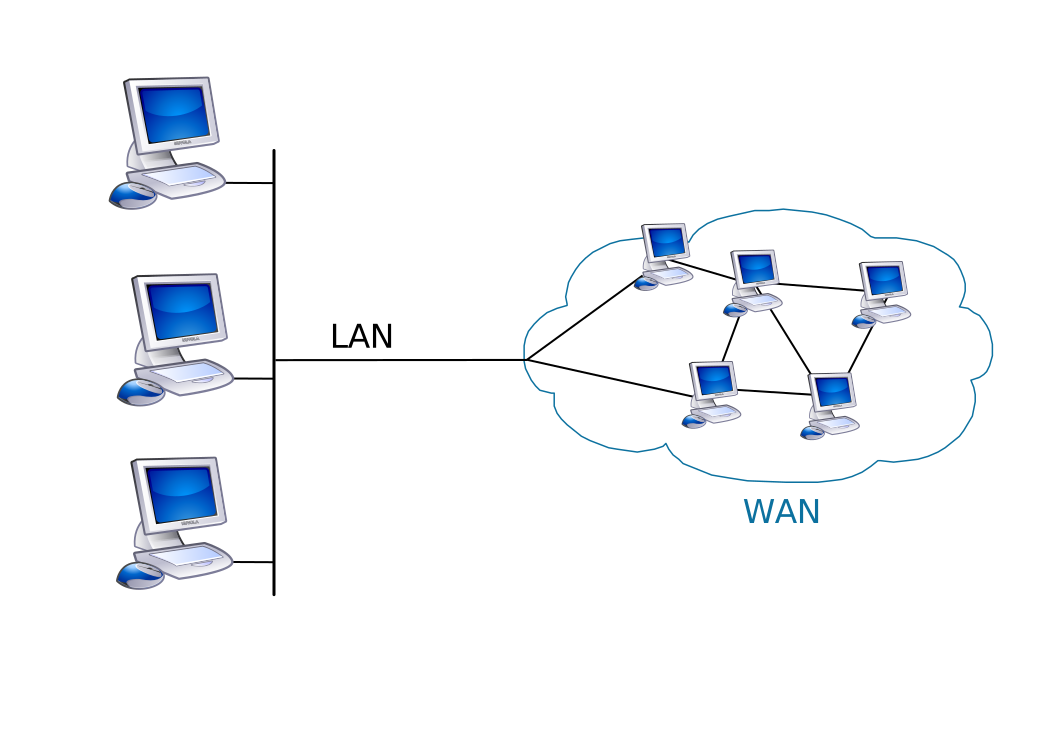
Local Area Network (LAN)
“A local area network (LAN) is a computer network that interconnects computers within a limited area such as a residence, school, laboratory, university campus or office building. By contrast, a wide area network (WAN) not only covers a larger geographic distance, but also generally involves leased telecommunication circuits. Ethernet and Wi-Fi are the two most common technologies in use for local area networks” (Wikipedia)
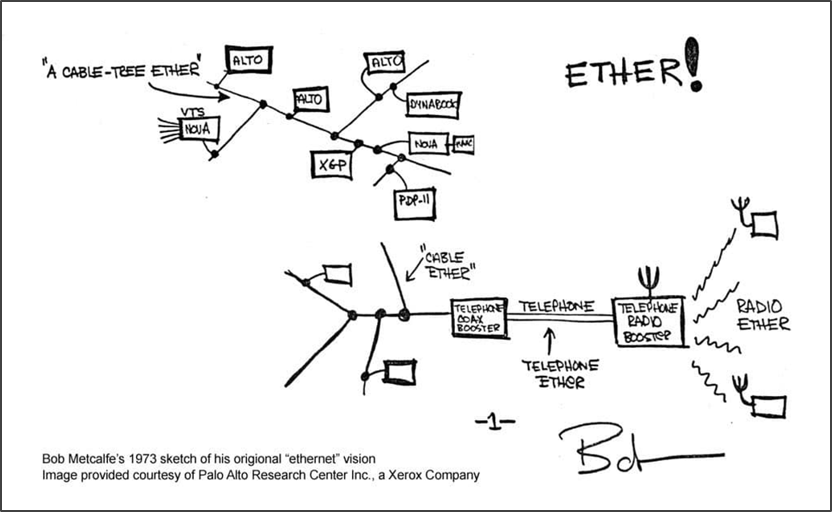
Ethernet
“Ethernet is a family of wired computer networking technologies commonly used in local area networks (LAN), metropolitan area networks (MAN) and wide area networks (WAN). It was commercially introduced in 1980 and first standardized in 1983” (Wikipedia)
Media Access Control (MAC) Address
“A media access control address (MAC address) is a unique identifier assigned to a network interface controller (NIC) for use as a network address in communications within a network segment. This use is common in…networking technologies, including Ethernet, Wi-Fi, and Bluetooth…As typically represented, MAC addresses are recognizable as six groups of two hexadecimal digits, separated by hyphens, colons, or without a separator” (Wikipedia)
Routing/Routers
“A router is a networking device that forwards data packets between computer networks. Routers perform the traffic directing functions on the Internet. Data sent through the internet, such as a web page or email, is in the form of data packets. A packet is typically forwarded from one router to another router through the networks that constitute an internetwork (e.g. the Internet) until it reaches its destination node” (Wikipedia)
Hops
“In wired computer networking, including the Internet, a hop occurs when a packet is passed from one network segment to the next. Data packets pass through routers as they travel between source and destination. The hop count refers to the number of network devices through which data passes from source to destination” (Wikipedia)
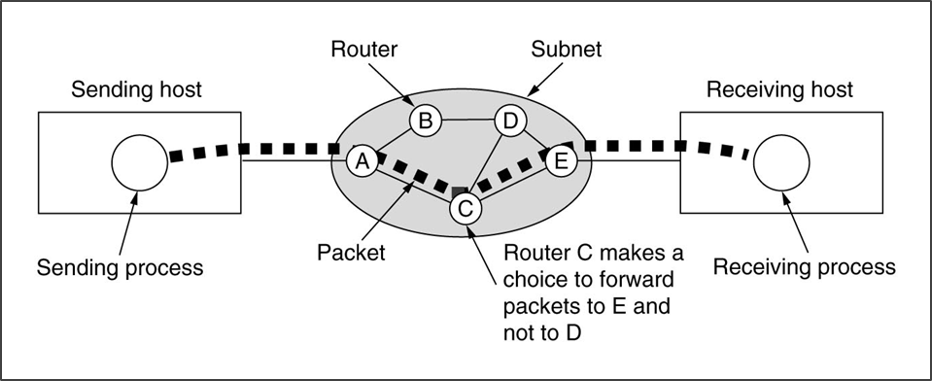
Packet Switching
“Packet switching is a method of grouping data that is transmitted over a digital network into packets. Packets are made of a header and a payload. Data in the header are used by networking hardware to direct the packet to its destination where the payload is extracted and used by application software. Packet switching is the primary basis for data communications in computer networks worldwide” (Wikipedia)
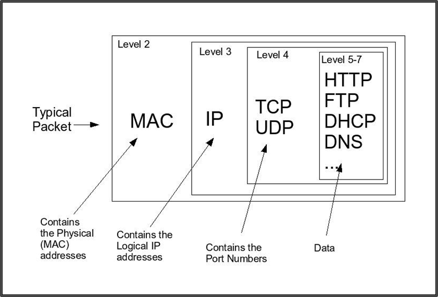
Network Packet
“A network packet is a formatted unit of data carried by a packet-switched network. A packet consists of control information and user data, which is also known as the payload. Control information provides data for delivering the payload, for example: source and destination network addresses, error detection codes, and sequencing information. Typically, control information is found in packet headers and trailers” (Wikipedia)
Internet Protocol (IP)
“The Internet protocol suite is the conceptual model and set of communications protocols used in the Internet and similar computer networks. It is commonly known as TCP/IP because the foundational protocols in the suite are the Transmission Control Protocol (TCP) and the Internet Protocol (IP). The Internet protocol suite provides end-to-end data communication specifying how data should be packetized, addressed, transmitted, routed, and received. This functionality is organized into four abstraction layers, which classify all related protocols according to the scope of networking involved. From lowest to highest, the layers are the link layer, containing communication methods for data that remains within a single network segment (link); the internet layer, providing internetworking between independent networks; the transport layer, handling host-to-host communication; and the application layer, providing process-to-process data exchange for applications” (Wikipedia)
Internet Protocol (IP) Address
“An Internet Protocol address (IP address) is a numerical label such as 192.0.2.1 that is connected to a computer network that uses the Internet Protocol for communication. An IP address serves two main functions: network interface identification and location addressing” (Wikipedia)
ARPANET
“The Advanced Research Projects Agency Network (ARPANET) was the first wide-area packet-switched network with distributed control and one of the first networks to implement the TCP/IP protocol suite. Both technologies became the technical foundation of the Internet. The ARPANET was established by the Advanced Research Projects Agency (ARPA) of the United States Department of Defense” (Wikipedia)
Internet of Things
“The Internet of things (IoT) describes physical objects (or groups of such objects) with sensors, processing ability, software, and other technologies that connect and exchange data with other devices and systems over the Internet or other communications networks” (Wikipedia)
Comprehension Check#
 |
Computer Networks Comprehension Check |
Application#
Q1a: Let’s use the ping command for a network test. Open a terminal shell (Terminal or Git BASH). Type ping followed by an IP address. A few you could choose from:
OpenDNS:
208.67.222.222and208.67.220.220Cloudflare:
1.1.1.1and1.0.0.1Google:
8.8.8.8and8.8.4.4
Sample command for Google:
ping 8.8.8.8
Press Enter/Return.
Q1b: Describe what you’re seeing in the ping command output. What do these results indicate about the network status? A couple resources that can help with understanding these results:
IBM, “
pingCommand”PageDuty, “How to Ping a Network for Testing Connectivity”
Q2a: Let’s run a similar test using the traceroute or tracert command. Still in the terminal, type tracert followed by a domain name or IP address.
Domain name example:
tracert google.com
IP address example:
tracert 8.8.8.8
Press Enter/Return.
Alternate traceroute workflow for MacOS users: Shaw Support, "How to run a Traceroute (Mac OS)."
Q2b: Describe what you’re seeing in the traceroute/tracert program output. What do these results indicate about the network status? How are they similar or different from the ping output?
A couple resources that can help with understanding these results:
InMotion Hosting, “How to Read a Traceroute”