
Tutorial: Terminal Wayfinding#
NOTE: The following text and images are adapted from UCLA faculty member Miriam Posner’s “Getting Started With Unix” tutorial
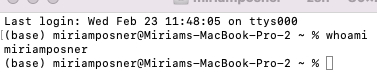
This is a terminal window, also called a shell. The active cursor showing up in the window is a command prompt. This is where you will type commands or instructions.
whoami
First, we can check your username using the whoami command. Type whoami in the shell and hit the Enter or Return key. The terminal returns your username, and the command prompt is ready for another command or instruction.
echo
Let’s try another command- this type, we’ll use echo to repeat a set of characters in quotation marks. Type echo 'Hello world!' into the terminal and hit the ‘Enter’ or ‘Return’ key. The echo command instructs the terminal to repeat whichever characters you include in the quotation marks.