
The Internet#
Lecture#
 |
Computer Networks |
Key Concepts#
Internet
“The Internet is the global system of interconnected computer networks that uses the Internet protocol suite (TCP/IP) to communicate between networks and devices. It is a network of networks that consists of private, public, academic, business, and government networks of local to global scope, linked by a broad array of electronic, wireless, and optical networking technologies” (Wikipedia)
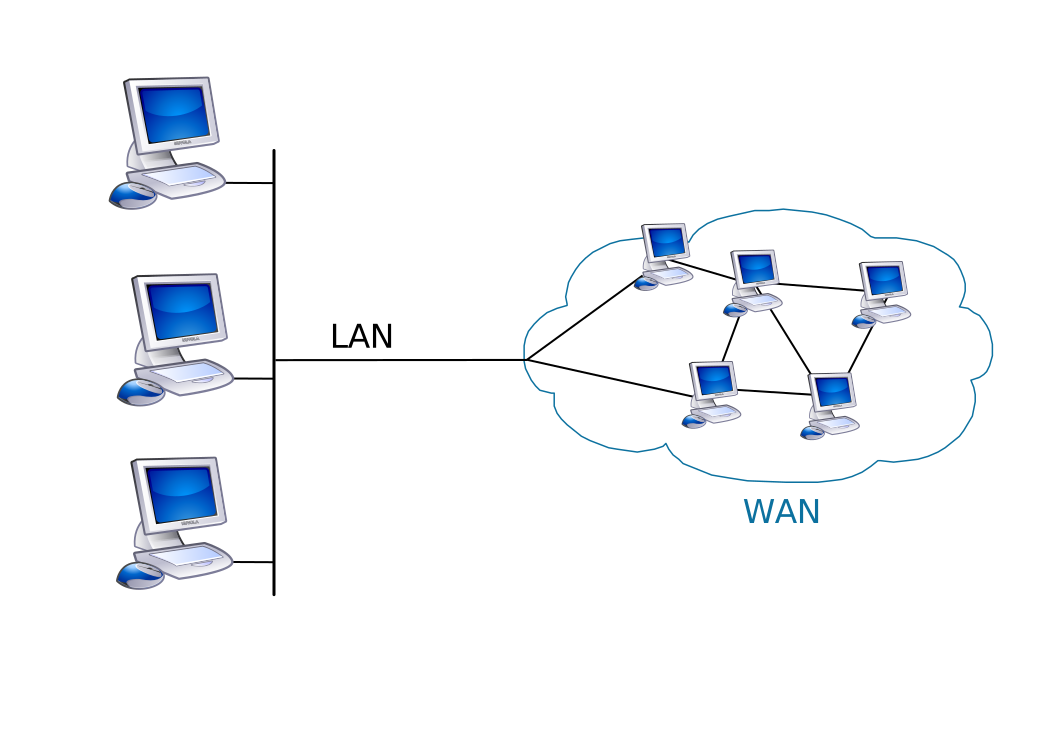
Wide Area Network (WAN)
“A wide area network (WAN) is a telecommunications network that extends over a large geographic area” (Wikipedia)
Internet Service Provider (ISP)
“An Internet service provider (ISP) is an organization that provides services for accessing, using, or participating in the Internet. ISPs can be organized in various forms, such as commercial, community-owned, non-profit, or otherwise privately owned” (Wikipedia)
Common commercial ISPs in the U.S. include: AT&T, Verizon, Xfinity, Comcast, Windstream
Packet Switching
“Packet switching is a method of grouping data that is transmitted over a digital network into packets. Packets are made of a header and a payload. Data in the header are used by networking hardware to direct the packet to its destination where the payload is extracted and used by application software. Packet switching is the primary basis for data communications in computer networks worldwide” (Wikipedia)
User Datagram Protocol (UDP)
“In computer networking, the User Datagram Protocol (UDP) is one of the core members of the Internet protocol suite. With UDP, computer applications can send messages, in this case referred to as datagrams, to other hosts on an Internet Protocol (IP) network” (Wikipedia)
Transmission Control Protocol (TCP, or TCP/IP)
“The Transmission Control Protocol (TCP) is one of the main protocols of the Internet protocol suite. It originated in the initial network implementation in which it complemented the Internet Protocol (IP). Therefore, the entire suite is commonly referred to as TCP/IP” (Wikipedia)
Internet Protocol (IP) Address
“An Internet Protocol address (IP address) is a numerical label such as 192.0.2.1 that is connected to a computer network that uses the Internet Protocol for communication. An IP address serves two main functions: network interface identification and location addressing” (Wikipedia)
Port
“In computer networking, a port is a number assigned to uniquely identify a connection endpoint and to direct data to a specific service. At the software level, within an operating system, a port is a logical construct that identifies a specific process or a type of network service. A port is identified for each transport protocol and address combination by a 16-bit unsigned number, known as the port number. The most common transport protocols that use port numbers are the Transmission Control Protocol (TCP) and the User Datagram Protocol (UDP)” (Wikipedia)
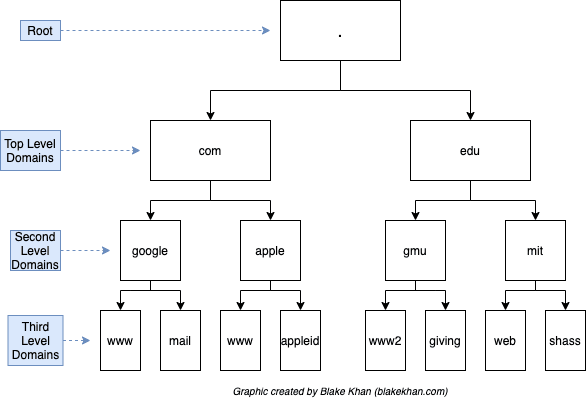
Domain Name System (DNS)
“The Domain Name System (DNS) is the hierarchical and decentralized naming system used to identify computers reachable through the Internet or other Internet Protocol (IP) networks” (Wikipedia)
Top-Level Domains (TLDs)
“A top-level domain (TLD) is one of the domains at the highest level in the hierarchical Domain Name System of the Internet after the root domain” (Wikipedia)
Examples include:
.com,.org,.edu
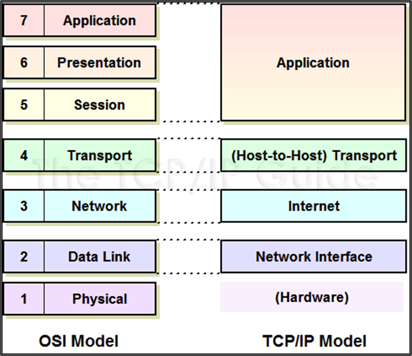
Open System Interconnection (OSI) Model
- "The Open Systems Interconnection model (OSI model) is a conceptual model that describes the universal standard of communication functions of a telecommunication system or computing system, without any regard to the system's underlying internal technology and specific protocol suites" (Wikipedia)
- Layers in the OSI Model:
- Application
- Presentation
- Session
- Transport
- Network
- Data link
- Physical
Comprehension Check#
 |
The Internet Comprehension Check |
Application#
Q3a: Let’s use the ipconfig (Windows) or ifconfig (Mac) commands to learn more about your computer’s network configuration. Open a terminal shell (Terminal or Git BASH). Type ipconfig (Windows) or ifconfig (Mac) followed by Enter/Return.
Q3b: Describe what you’re seeing in the output. What information are these results providing about your network? How do they connect to concepts covered in this lab?
A couple resources that can help with understanding these results:
ipconfigLazyAdmin, “How to use the ipconfig command and options explained”
Meridian Outpost, “How to use ipconfig command with examples”
ifconfigStackExchange, “MacOS ifconfig output”
Oracle, “Monitoring the interface with the
ifconfigcommand”