
Putting It All Together#
“All computers have a CPU that can be divided into two pieces. The first is the datapath, which is a network of storage units (registers) and arithmetic and logic units…connected by buses…where the timing is controlled by clocks.” (Linda Null and Julia Lobur, 2006. The Essentials of Computer Organization and Architecture, pp. 2016.)
Let’s go back to the laptop specs we looked at in the beginning of this chapter.
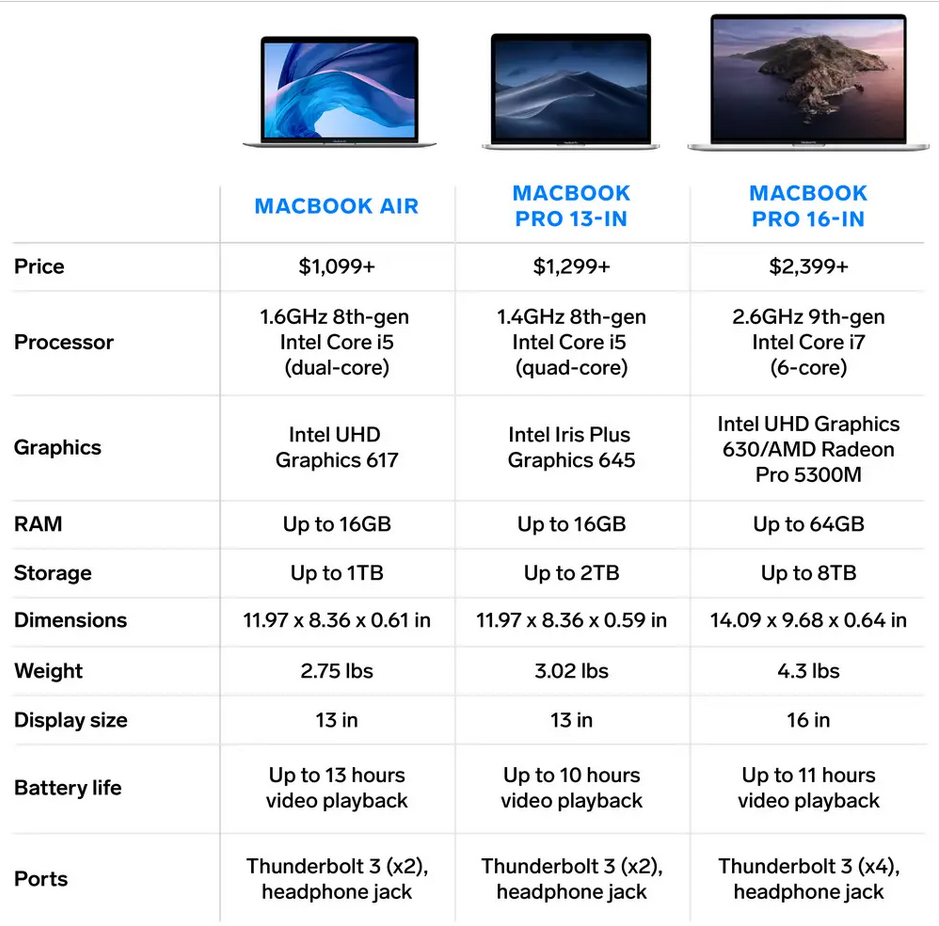
Hopefully we’re gaining familiarity with some of these terms and concepts.
Let’s find the hardware specs for your personal computer (or a school computer you can access):
Q5: How would you describe some of these specifications in your own words, using terms and concepts covered in this lab? Specific aspects of your computer's system to discuss: persistent memory, short-term memory (RAM), processor, graphics, ports or peripherals
You may be wondering if these specifications matter for your regular computer use. That’s a fair question.
Your computer’s input devices control what types of devices you can connect to the computer, from the number and type of USB ports to HDMI connections and other adapters.
Your computer’s output devices, especially the display, control screen size, resolution, and other aspects of the visual interface.
Sometimes, operating system updates can run into compatibility issues with the underlying computer hardware. For example, the hardware in Professor Walden’s second-generation iPad stopped supporting iOS updates in 2016, meaning the tablet isn’t able to run current versions of most apps or programs. Mac operating system updates often have specific hardware requirements and can only be rolled out on select models. The recent Windows 11 roll out has very specific minimum system requirements.
Learn more about the Windows 11 rollout: